Christmas photo editor
Add a Santa hat to a photo: type the change, keep the rest
Upload any photo and describe the Christmas edit: a Santa hat, an ugly sweater, elf ears, reindeer antlers, snow, a tree and fairy lights behind you. The face and everything you name stay as they were.

One edit of a hallway selfie with Nano Banana Pro Edit: "Add a classic red Santa hat". Unedited output; the woman is AI-generated.
A selfie, a sentence, a Santa hat
01 The photo

A hallway selfie in a grey hoodie.
02 The instruction
Add a classic red Santa hat with white fur trim and a white pom-pom on her head, sitting naturally on her hair. Keep her face, expression, hair, grey hoodie, pose, the hallway and the light exactly the same.
What to add, and what to leave alone.
03 The edit
Nano Banana Pro Edit, unedited.
Every result on this page is a single edit of the photo beside it. The people and the dog are AI-generated examples, not customers.
How do you add a Santa hat to a photo?
Upload the photo, then write one sentence that says what to add and a second that says what to keep. The editing model redraws the picture with the hat on the head, at the right angle and in the light of the room, and leaves the face alone.
A camera filter or sticker app pastes a flat hat over the top. An edit model puts it into the photo: the brim covers the hair it should cover and the pom-pom hangs to one side. The same two-sentence pattern works for every edit on this page. Three to copy:
Add a classic red Santa hat with white fur trim and a white pom-pom on her head, sitting naturally on her hair. Keep her face, expression, hair, clothes, pose, the background and the light exactly the same.
Add a red Santa hat with white fur trim on the head of each person, one hat per person. Keep every face, expression, hairstyle, glasses, clothes, poses, the room and the light exactly the same.
Change his shirt to a loud knitted ugly Christmas sweater in red and green with reindeer and snowflakes, no words on it. Keep his face, expression, hair, pose, the background and the light exactly the same.
What it does
- A hat that sits on the hair
- The hat is drawn into the photo with the right size, angle and shadow, so it sits on the head like a real one.
- The face stays
- Say what must not change and the model leaves the face, expression and pose alone.
- Everyone in the group
- Ask for one hat per person. Four friends on a sofa each got their own in our example.
- Pets too
- A small hat or antlers on the dog or cat, in the same photo as you.
- More than hats
- Christmas sweater, elf ears, antlers and a red nose, snow, a tree and fairy lights behind you.
- Stack the edits
- Run one change, then edit the result again: hat first, then snow, then the background.
The Christmas edits, before and after
Each row starts with the photo that went in. Every result is one instruction to Nano Banana Pro Edit, unedited. The people and the dog are AI-generated examples.
Her photoSanta hat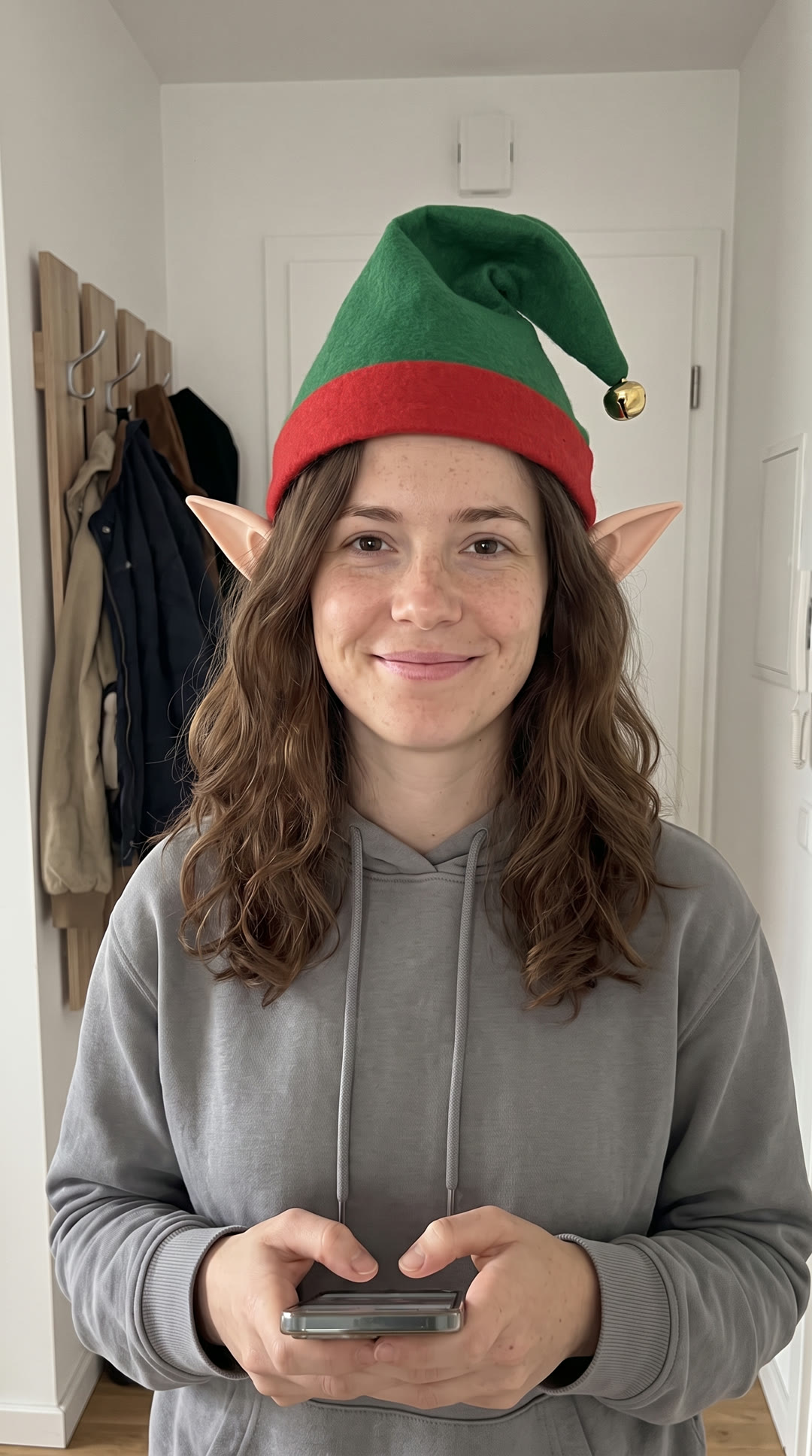 Elf ears and hat
 Reindeer antlers
Things to wear on your head
 Christmas sweater
 Falling snow
 Tree and fairy lights
 Hat, snow and tree
The sweater, the snow and the room
 Their photo
 A hat each
 A sweater each
Four friends on a sofa
 Their photo
 Hat on the dog
 Antlers and a hat
A man and his golden retriever
How to add a Santa hat to a photo
- 01
Upload the photo
JPG, PNG or WebP. Pick one where the heads are fully in the frame with some space above them, so the hat has room.
Head cut off at the top? Use a photo with more headroom, or extend the picture first with the image extender.
- 02
Type the change
First what to add: "Add a red Santa hat with white fur trim on her head." Then what to keep: "Keep her face, hair, clothes, the background and the light exactly the same."
Stuck? Start from a preset at the top of this page and change the details.
- 03
Generate and download
Check the face and the hat, then download. For another hat shape or angle, run the same instruction again.
Want snow or a sweater as well? Edit the result again, one change at a time.
More to make for Christmas
A whole Christmas scene
Your faces by the tree or in the snow.
A Christmas profile picture
A festive avatar from one selfie.
A Christmas card
Your photo with a greeting and names.
Pet portraits
The dog or cat as a Christmas portrait.
A message from Santa
An AI Santa reads a script you write.
Make the photo move
Turn the edited photo into a short clip.
Tips for a clean edit
- Say who gets the hat: "on her head", "on the dog's head", "on each of the four people".
- Always add a keep sentence that names the face, hair, clothes and background.
- One change per run gives the cleanest result. Chain runs for hat plus snow plus lights.
- Describe the item: "red with white fur trim and a pom-pom", "green felt with a gold bell".
- For a sweater, add "no words on it" unless you want text, and put any text in quotes.
- Changing the background also changes the light on the person. That is what makes it look real, so expect warmer skin tones under fairy lights.
- In the UK, Christmas Jumper Day is 10 December 2026: a group photo in knitted jumpers takes one instruction.
- Only edit photos of people who are happy to be in them.
How do you add a Santa hat to a photo?
Upload the photo to an image editing model and write the change as a sentence: add a red Santa hat on the person's head, keep everything else the same. Nano Banana Pro Edit redraws the photo with the hat in place, matched to the angle of the head and the light in the room.
This differs from a sticker or a camera filter, which pastes a flat hat on top. Here the hat covers the hair it should cover and takes the light of the photo. The same sentence pattern adds a Christmas sweater, elf ears, antlers, snow or a decorated tree behind you.
FAQ
How do I add a Santa hat to a photo?
Upload the photo in Image Studio, choose Nano Banana Pro Edit and type the change, for example: "Add a red Santa hat with white fur trim on her head. Keep her face, hair, clothes and the background exactly the same." Generate, check it and download.
Is this a Christmas filter?
It does the job of one, in a different way. A camera filter overlays the same sticker on a live picture. Here you upload a finished photo and the model redraws it with the hat, sweater, snow or lights you describe, so each result fits that photo.
Will my face change?
It should not. Add "keep her face and expression exactly the same" to the instruction. In every example on this page the faces match the photo that went in. If a result drifts, run it again.
Can I add Santa hats to everyone in a group photo?
Yes. Write "on the head of each person, one hat per person". Our sofa photo has four people and each got a hat in one run. In large groups, check that nobody was skipped.
Can I put a Santa hat on my dog or cat?
Yes. Name the animal: "Add a small red Santa hat on the dog's head." In the same sentence you can give the person next to it a different item.
Can it put me in an ugly Christmas sweater?
Yes. Ask to change the top you are wearing to a knitted Christmas sweater and describe the colours and pattern. In the UK the same instruction with "Christmas jumper" works just as well.
How much does it cost?
Each edited image is paid in credits: Nano Banana Pro Edit is 30 credits at 1K and 2K. The Standard plan is $24 a month for 2,000 credits, about 66 edits. The price shows before you generate.
Are the people on this page real?
No. Every person and the dog, including the "before" snapshots, were generated with AI as examples. Use photos of yourself or of people who agree to it.
Related
More to make this Christmas

AI Christmas photos
Turn an everyday photo into AI Christmas photos of yourself, your partner or your parents

Personalized Santa video
Make a personalized Santa video message

AI Christmas card maker
Make a Christmas card with AI: a photo card from your own picture with your greeting and names, an illustrated card, or an animated e-card. Print or share.

Christmas pfp maker
Make a Christmas pfp from your selfie with your face kept

AI elf video maker
Elf video maker: put your face and your friends' faces on a dancing Christmas elf video. Pick an elf dance clip, add one photo per dancer, get the video back.

Christmas video maker
Make a short Christmas greeting video with AI

AI Christmas photo prompts
Copy-paste AI Christmas photo prompts for a selfie

AI Christmas image generator
Describe a Christmas image and get it

AI Christmas wallpaper
Make a Christmas wallpaper or background from one sentence

AI Christmas pet portraits
Turn a phone photo of your dog or cat into Christmas pet photos

Santa voice generator
Type a message and hear it in a warm, deep AI Santa voice.

AI Christmas song generator
Make an original Christmas song with AI

AI New Year card maker
Make a New Year card with AI: add your photo and the faces stay, or describe a design. "Happy New Year 2027" and your names are written on the card.

Three Kings video message
Make a Three Kings video message for Día de Reyes